What is a Custom URL Shortener?


You’ve seen them everywhere: bit.ly/3xF9kL, tinyurl.com/2s4dmk, t.ly/xyz123.
These generic shortened links work. But they don’t exactly inspire confidence. They hide where the link leads, look potentially suspicious, and do absolutely nothing for your brand.
Now compare that to: link.nike.com/new-arrivals or go.hubspot.com/demo.
The difference is immediate. One looks like spam. The other looks like a trusted brand inviting you to take action.
A custom URL shortener transforms every link you share into a branded touchpoint that builds trust, boosts click-through rates, and gives you complete control over your link management.
In this guide, you’ll learn exactly what a custom URL shortener is, why branded short links outperform generic ones by 2.3x, and how to set up your own custom link shortener in minutes.
What is a Custom URL Shortener?
A custom URL shortener is a tool that transforms long, complex URLs into short, clean, branded links using your own domain name instead of a generic third-party domain.
Instead of: bit.ly/3xF9kL
You get: link.yourbrand.com/summer-sale
The difference is subtle but powerful. A custom URL shortener puts your brand front and center in every link you share, whether that’s in emails, social posts, paid ads, or printed materials.
Here’s how it works:
- You choose a short custom domain (like link.yourbrand.com or go.yourbrand.com)
- You connect that domain to a link management platform
- The platform generates short links using your branded domain
- Every link you create reinforces your brand identity
When someone clicks a branded short link, they’re redirected to your destination URL. But unlike generic shorteners, they see your brand name before clicking, which builds trust and increases the likelihood they’ll engage.
Custom URL shorteners also give you powerful analytics, UTM tracking integration, and team collaboration features that generic link shorteners simply don’t offer.
Custom URL Shortener vs Generic Link Shortener
Understanding the difference between custom and generic link shorteners is crucial for any marketer serious about campaign performance.
Generic link shorteners like Bitly’s free tier, TinyURL, and similar services create shortened URLs using their own domains. The links work fine, but they offer no brand recognition and often look suspicious to recipients.
Custom URL shorteners use your own domain to create branded short links that reinforce your identity with every share.
Here’s a side-by-side comparison:
| Feature | Generic Shortener | Custom URL Shortener |
|---|---|---|
| Domain | bit.ly, tinyurl.com | link.yourbrand.com |
| Brand Recognition | None | Every link promotes your brand |
| Trust Level | Low (looks suspicious) | High (recognizable brand) |
| Click-Through Rate | Baseline | Up to 39% higher |
| Custom Slugs | Limited or paid | Full customization |
| Analytics | Basic click counts | Geographic, device, referrer data |
| UTM Integration | Manual | Automatic with templates |
| Team Features | Minimal | Workspaces, permissions, templates |
| Link Ownership | Platform owns links | You control your domain |
The performance gap between these two approaches is significant. According to Bitly’s 2025 data, custom domains get 2.3x more clicks on average compared to generic shortened links.
Among Bitly Free users (generic links), traffic dropped by 48% from January through September 2025 compared to the same period in 2024. Meanwhile, paid Bitly users with branded domain feature saw traffic grow by 88% during the same timeframe.
The message is clear: audiences increasingly ignore or distrust generic shortened links. Branded short links are becoming essential for maintaining engagement.
7 Benefits of Using a Custom URL Shortener
Switching from generic link shorteners to a custom URL shortener delivers measurable advantages across your entire marketing operation.
1. Increased Click-Through Rates
The most immediate benefit of custom URL shorteners is higher click-through rates. Studies consistently show that branded links outperform generic shortened URLs by significant margins.
Research from Rebrandly found that branded links can improve click-through rates by up to 39% compared to generic shorteners. Other studies put the improvement at around 34%.
Why the boost? People trust recognizable brands. When recipients see your company name in a URL, they know where the link leads and feel confident clicking. Generic shorteners like bit.ly/xyz123 could lead anywhere, and increasingly cautious internet users simply scroll past them.
This CTR improvement compounds across every channel. If you’re sending 100,000 emails per month and improving click-through rate by even 20%, that’s thousands of additional engaged visitors without spending an extra dollar on advertising.
2. Enhanced Brand Recognition
Every link you share becomes a mini billboard for your brand. Whether it’s in an email signature, social media post, print advertisement, or podcast mention, your domain name is front and center.
Compare:
- Generic:
bit.ly/3xF9kL(What brand is this?) - Branded:
link.nike.com/new-arrivals(Instantly recognizable)
Over time, this consistent exposure builds brand recognition. Your audience begins to associate your custom link domain with quality content and valuable offers. They recognize your links in crowded social feeds and cluttered inboxes.
This recognition extends beyond digital. When you include branded short links on business cards, event signage, or packaging, you’re reinforcing your brand identity in the physical world too.
3. Improved Link Trust and Security Perception
In an era of phishing attacks and malicious links, internet users have become rightfully skeptical of unfamiliar URLs. Generic shortened links are often associated with spam, scams, and malware.
When you use a custom URL shortener, you’re essentially vouching for the destination with your brand name. Recipients immediately know:
- Who sent the link (your brand)
- That it’s legitimate (not spam or phishing)
- That clicking is safe
This trust factor is especially valuable for e-commerce brands, B2B SaaS companies, and anyone sending links to customers or prospects who haven’t interacted with your brand before.
Social media platforms have also begun limiting reach for posts containing unfamiliar links. Branded short links from your own domain are less likely to trigger spam filters or algorithmic penalties than generic shorteners.
4. Advanced Analytics and Tracking
Generic link shorteners typically offer basic click counts. Custom URL shorteners provide comprehensive analytics that help you understand not just how many clicks you get, but who’s clicking and when.
With a proper custom link shortener, you can track:
- Geographic data: Which countries, cities, and regions generate the most engagement
- Device breakdown: Desktop vs. mobile vs. tablet performance
- Referrer sources: Where clicks originate from
- Time patterns: When your audience is most active
- Real-time performance: See results as they happen, not days later
This granular data helps you optimize campaigns in real-time rather than waiting for end-of-month reports. You can identify which channels perform best, which geographic markets to target, and what times to post for maximum engagement.
5. Seamless UTM Parameter Integration
Custom URL shorteners designed for marketers integrate directly with UTM parameters, the tracking codes that power Google Analytics campaign attribution.
Instead of manually adding utm_source, utm_medium, and utm_campaign to every link (and inevitably making typos that corrupt your data), custom URL shorteners automate the process.
With platforms like linkutm, you can:
- Create reusable UTM templates for consistent naming conventions
- Auto-populate parameters based on campaign context
- Enforce lowercase and proper formatting to prevent data fragmentation
- Generate hundreds of properly tagged links in minutes via bulk import
This integration means your GA4 reports stay clean and accurate. You can actually trust your campaign attribution data because human error has been removed from the equation.
6. Dynamic QR Code Generation
Modern custom URL shorteners automatically generate QR codes for every branded link you create. This bridges offline and online marketing with trackable codes for events, print materials, product packaging, and physical locations.
Each QR code links to your branded short URL, so you get the same analytics and tracking whether someone types your link or scans a code. You can customize QR codes with your brand colors and logo while maintaining full scan analytics.
For event marketers, retailers, and anyone running offline campaigns, this feature transforms every flyer, poster, and business card into a trackable marketing channel.
7. Team Collaboration and Centralized Management
Marketing is a team sport. Custom URL shorteners built for teams offer collaboration features that prevent chaos and ensure consistency:
- Shared workspaces: Everyone accesses the same link library
- Role-based permissions: Control who can create, edit, or delete links
- Reusable templates: Enforce naming conventions across the team
- Centralized dashboard: Find any link from any campaign instantly
- Activity logs: Track who created or modified links
No more hunting through spreadsheets or asking colleagues “do you have the link for that campaign?” Everything lives in one searchable, organized system.
How to Create a Custom URL Shortener
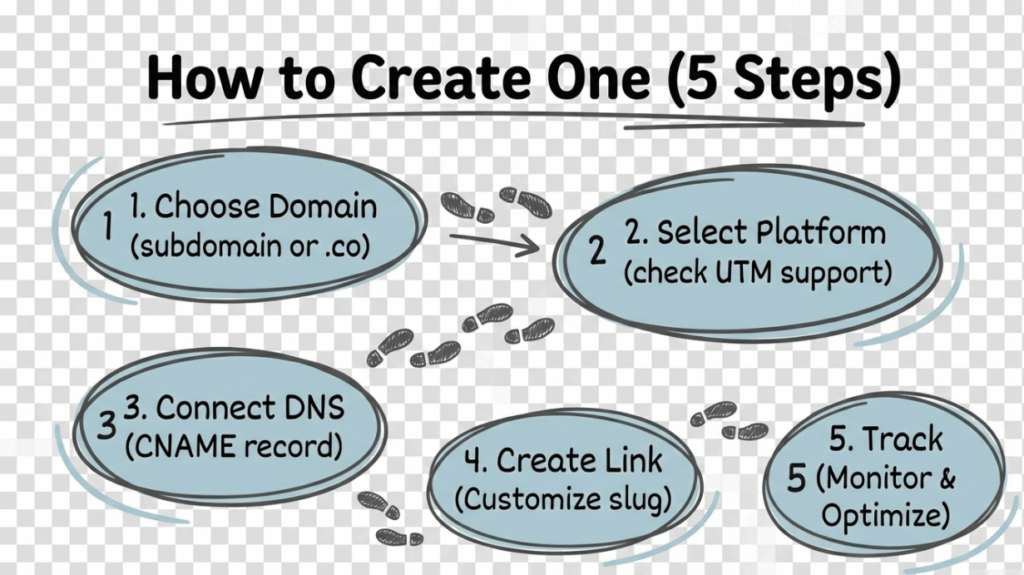
Setting up a custom URL shortener is simpler than most marketers expect. Here’s the complete process in five steps:
Step 1: Choose Your Custom Domain
First, decide on the domain name for your branded short links. You have two main options:
Option A: Use a subdomain of your existing website
- link.yourbrand.com
- go.yourbrand.com
- get.yourbrand.com
This approach leverages your existing domain authority and is easier to set up since you already own the domain.
Option B: Register a new short domain
- yourbrand.co
- yourbr.nd
- ybrand.link
This approach creates very short links but requires purchasing and configuring a new domain.
Either way, choose something that’s:
- Short (easier to type and remember)
- Clearly connected to your brand
- Professional and trustworthy looking
Most marketers start with a subdomain (link.yourbrand.com) because it’s faster to implement and maintains clear brand association.
Step 2: Select a Link Management Platform
Choose a custom URL shortener platform that supports custom domains and offers the features you need. Key considerations:
- Custom domain support: Can you connect your own domain?
- UTM automation: Does it integrate with UTM parameters?
- Analytics depth: What tracking data is available?
- Team features: Workspaces, permissions, shared templates?
- Pricing: What fits your budget and usage volume?
Popular options include linkutm (built specifically for marketers with UTM focus), Rebrandly (brand-focused), Short.io (developer-friendly), and Bitly (established enterprise solution).
For marketers who need clean campaign attribution in GA4, platforms that emphasize UTM integration like linkutm’s UTM link builder offer significant advantages over generic shorteners.
Step 3: Connect Your Domain
Once you’ve chosen a platform, connect your custom domain. This typically involves:
- Adding a DNS record (usually a CNAME) pointing your subdomain to the platform
- Verifying domain ownership
- Enabling SSL/HTTPS (most platforms handle this automatically)
The exact process varies by platform, but most modern custom URL shorteners guide you through setup in under 10 minutes. SSL certificates are usually provisioned automatically so your branded links are secure from day one.
Step 4: Create Your First Branded Link
With your domain connected, you’re ready to create branded short links:
- Enter your destination URL (the long link you want to shorten)
- Customize the slug (the part after your domain: link.yourbrand.com/this-part)
- Add UTM parameters for campaign tracking
- Generate the link
Best practice: Use descriptive slugs that hint at the destination. link.yourbrand.com/spring-sale is far more effective than link.yourbrand.com/a7f9x2.
Step 5: Track and Optimize
After sharing your branded links, monitor performance in your dashboard:
- Which links get the most clicks?
- What times and days perform best?
- Which channels drive the highest engagement?
- Are there geographic patterns to explore?
Use these insights to optimize future campaigns. The beauty of custom URL shorteners is the real-time feedback loop. You don’t wait weeks for data; you see what’s working immediately and adjust accordingly.
Best Custom URL Shortener Tools for 2026
The custom URL shortener market has matured significantly, with options ranging from free tools to enterprise platforms. Here are the top solutions for different use cases:
linkutm
Best for: Marketers focused on campaign tracking and GA4 attribution
linkutm is built specifically for marketers who need accurate campaign attribution, not just link shortening. Key features include:
- Smart UTM builder with automatic naming convention enforcement
- Reusable templates for consistent parameter formatting
- Custom domain support on all plans
- Real-time click analytics with GA4 integration
- Team workspaces and role-based permissions
- Bulk import for creating thousands of links from CSV
- Dynamic QR code generation
Pricing starts with a generous free tier (25 links/month) and scales to agency plans for high-volume operations. Check linkutm pricing for current details.
Rebrandly
Best for: Brand-conscious marketers and agencies managing multiple clients
Rebrandly emphasizes branding capabilities with support for multiple custom domains, detailed link analytics, and team collaboration features. Strong API and integration ecosystem.
Short.io
Best for: Developers and teams needing API-first solutions
Short.io offers robust API access, detailed analytics, and reliable infrastructure. Good choice for teams building custom integrations or automating link creation at scale.
Bitly
Best for: Enterprise organizations needing established infrastructure
Bitly is the most recognized name in link shortening with enterprise-grade features, extensive integrations, and proven reliability. Custom domains require paid plans.
Dub
Best for: Modern teams wanting a clean, fast interface
Dub is a newer entrant with a polished user experience, AI-powered slug suggestions, and a generous free tier. Good for teams prioritizing user experience.
Custom URL Shortener Best Practices
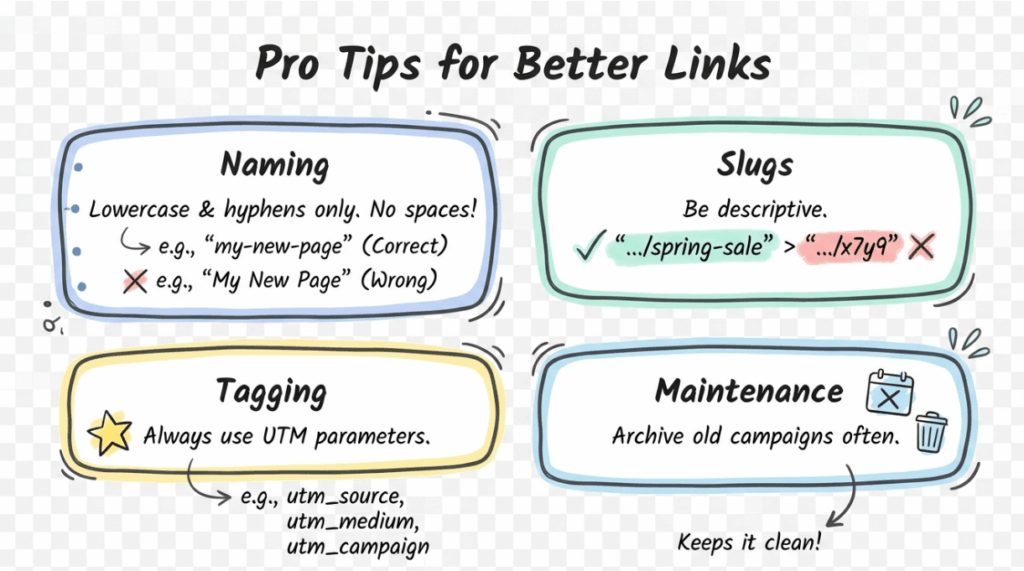
Maximize the impact of your custom URL shortener with these proven practices:
Establish Naming Conventions
Before creating your first link, define rules for your team:
- Always use lowercase (GA4 treats “Newsletter” and “newsletter” as different sources)
- Replace spaces with hyphens or underscores
- Be descriptive but concise (spring-sale-2026, not s26)
- Document conventions so everyone follows the same patterns
Following UTM best practices prevents the data fragmentation that makes analytics unreliable.
Use Descriptive Slugs
The slug (the path after your domain) should hint at the destination:
- Good:
link.yourbrand.com/pricing-guide - Bad:
link.yourbrand.com/x7k2m9
Descriptive slugs increase trust and improve click-through rates. Recipients know where they’re going before they click.
Tag Everything with UTM Parameters
Every branded link should include UTM tracking so you can measure campaign performance in GA4. At minimum, include:
- utm_source (where the link appears)
- utm_medium (the marketing channel)
- utm_campaign (the specific campaign name)
Custom URL shorteners with UTM automation make this effortless.
Monitor Performance Regularly
Check your link analytics weekly to identify:
- Top performing links and campaigns
- Underperforming links that need optimization
- Geographic or device patterns to leverage
- Best times for sharing content
Data-driven iteration is what separates good marketers from great ones.
Keep Your Links Organized
As your link library grows, organization becomes critical:
- Use folders or tags to group links by campaign or channel
- Archive completed campaigns to reduce clutter
- Maintain a consistent naming structure
- Train team members on your organizational system
Common Custom URL Shortener Questions
What’s the difference between a custom URL shortener and a branded URL shortener?
These terms are essentially interchangeable. Both refer to link shortening tools that use your own domain name rather than a generic third-party domain. Some people use “custom” to emphasize the domain customization and “branded” to emphasize the branding benefits, but the underlying technology is the same.
For a deeper dive, see our guide on what is a vanity URL, which covers related terminology.
Do custom short links affect SEO?
Custom short links don’t directly impact your website’s SEO rankings. Search engines follow redirects to the destination URL, so link equity passes through normally.
However, branded short links indirectly help SEO by:
- Increasing click-through rates (more traffic to your content)
- Improving social sharing (more backlink opportunities)
- Building brand recognition (more branded searches)
The redirect itself (301 or 302) is handled properly by reputable custom URL shortener platforms.
Can I use my existing website domain?
Yes. Most custom URL shorteners support subdomains of your existing domain (link.yourdomain.com). This is actually the recommended approach because:
- You don’t need to purchase a new domain
- Your brand association is immediately clear
- Setup is faster with fewer DNS changes
- You leverage existing domain trust
Simply create a subdomain and point it to your link management platform.
How much does a custom URL shortener cost?
Pricing varies widely:
- Free tiers: Many platforms offer 25-100 links/month with basic features
- Personal/Small business: $9-29/month for more links, analytics, and team features
- Agency/Enterprise: $79-200+/month for high volume, multiple domains, advanced features
The right tier depends on your link volume, team size, and feature requirements. Most marketers start with a free tier and upgrade as needs grow.
Are custom short links more secure than generic ones?
Yes, in several ways:
- Trust: Recipients can verify the link comes from a known brand
- Control: You manage your domain and can quickly disable compromised links
- Visibility: Your analytics show unusual click patterns that might indicate abuse
- Persistence: You own your domain, so links won’t break if a third-party platform changes policies
Custom URL shorteners with password protection and expiration features add additional security layers for sensitive content.
Start Using a Custom URL Shortener Today
Generic link shorteners are leaving money on the table. Every bit.ly or tinyurl link you share is a missed opportunity to build brand recognition, increase click-through rates, and maintain control over your marketing links.
The data is clear:
- Custom domains get 2.3x more clicks than generic shortened links
- Branded links improve CTR by up to 39%
- Traffic to generic short links dropped 48% in 2025 while branded link traffic grew 88%
Setting up a custom URL shortener takes less than 30 minutes but delivers benefits for every campaign you run from that point forward.
Here’s your action plan:
- Choose your custom domain (link.yourbrand.com is a safe starting point)
- Select a link management platform with UTM integration
- Connect your domain and create your first branded link
- Tag all your campaign links with UTM parameters for accurate attribution
- Monitor performance and optimize based on real data
Ready to build branded links that drive results? linkutm makes it effortless with custom domain support, UTM automation, and team collaboration features built specifically for marketers who care about campaign attribution.
Start your free trial and create your first branded short link in under 3 minutes.
