What is a Vanity URL? Complete Guide to Custom Branded Links
Picture this: You’re scrolling through your inbox and spot two links. One says bit.ly/x7k2m. The other says shop.nike.com/new-arrivals. Which one do you trust? Which one would you click?
If you chose the Nike link, you’re not alone. That’s a vanity URL in action.
Generic shortened links look suspicious. They hide the destination, offer zero brand recognition, and make your professional marketing campaigns look like spam. In an era where 81% of consumers say they need to trust a brand before buying, every link you share either builds or breaks that trust.
This guide explains exactly what a vanity URL is, why it matters for your marketing, and how to create one that actually drives clicks. You’ll learn the key differences between vanity URLs and regular links, see real examples from major brands, and get a step-by-step process for setting up your own custom branded links.
What is a Vanity URL?
A vanity URL is a customized, branded web address that redirects visitors to a longer destination URL. Instead of sharing messy links filled with tracking codes and random characters, you share a clean, memorable link that reflects your brand identity.
Here’s how it works:
Before (Generic URL):yoursite.com/products/category/summer-collection-2025/item-12345? ref=email&source=newsletter&campaign=spring
After (Vanity URL):brand.link/summer-sale
When someone clicks your vanity URL, they’re automatically redirected to the full destination page. This happens through a 301 redirect, which is invisible to the visitor. They click the short, branded link and land on the correct page instantly.
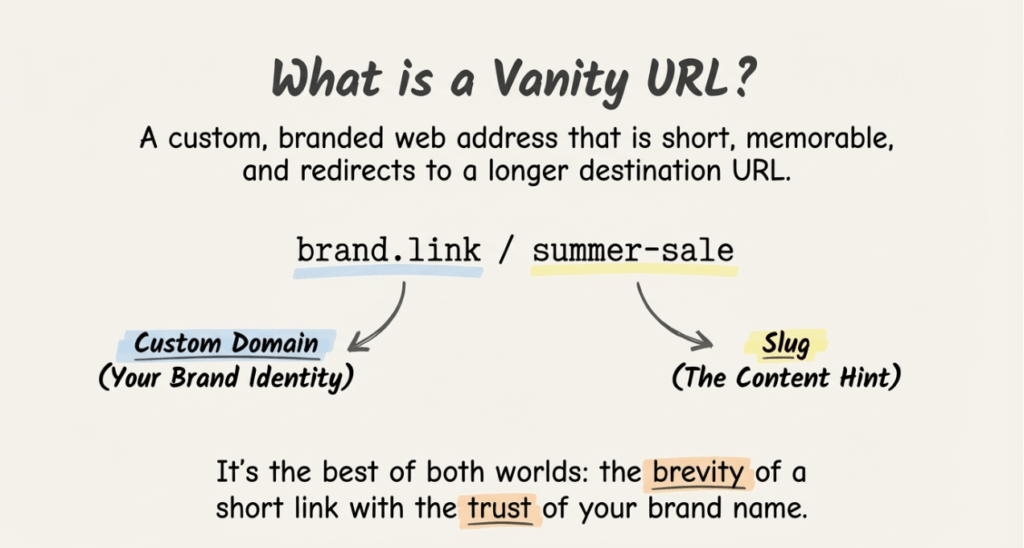
The Anatomy of a Vanity URL
Every vanity URL has two main components:
- Custom Domain: The branded part that identifies your company (e.g.,
brand.link,go.yourcompany.com,shop.nike.com) - Slug: The descriptive path that hints at the destination (e.g.,
/summer-sale,/demo,/podcast-episode-42)
Together, they create a link that’s short, memorable, and immediately recognizable as belonging to your brand.
Major companies use vanity URLs constantly.LinkedIn shortens links to lnkd.in. Pepsi uses pep.si. YouTube created youtu.be. These aren’t random choices. They’re strategic branding decisions that reinforce brand recognition with every single share.
Vanity URL vs Regular URL: What’s the Difference?
Understanding the difference between vanity URLs, regular URLs, and generic short links helps you choose the right approach for each marketing situation.
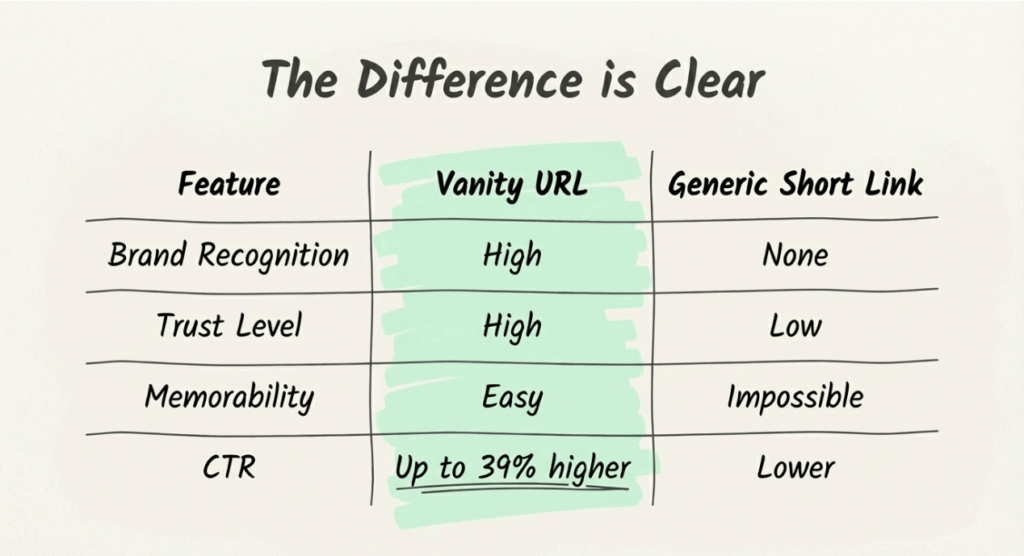
| Feature | Vanity URL | Regular URL | Generic Short Link |
|---|---|---|---|
| Example | brand.link/sale | yoursite.com/products/category/item? ref=123 | bit.ly/3xF9kL |
| Brand Recognition | High | Medium | None |
| Memorability | Easy to remember | Difficult | Impossible |
| Trust Level | High | Medium | Low |
| Click-Through Rate | Up to 39% higher | Baseline | Lower than branded |
| Customization | Full control | Limited | Minimal |
| Tracking | Built-in with UTM | Requires manual setup | Platform-dependent |
Regular URLs are your standard web addresses. They work fine for organic navigation, but become unwieldy in marketing materials. Imagine trying to fit yoursite.com/blog/2025/01/complete-guide-to-email-marketing-strategies-for-b2b-saas-companies on a business card.
Generic short links (bit.ly, tinyurl) solve the length problem but create new ones. They strip away your brand identity and look suspicious. Users have learned that shortened links can hide malicious destinations.
Vanity URLs give you the best of both worlds: short, clean links that maintain brand visibility and build trust with every click.
7 Key Benefits of Vanity URLs
Why do over 90% of top brands use vanity URLs for their campaigns? Because the benefits compound across every marketing channel.
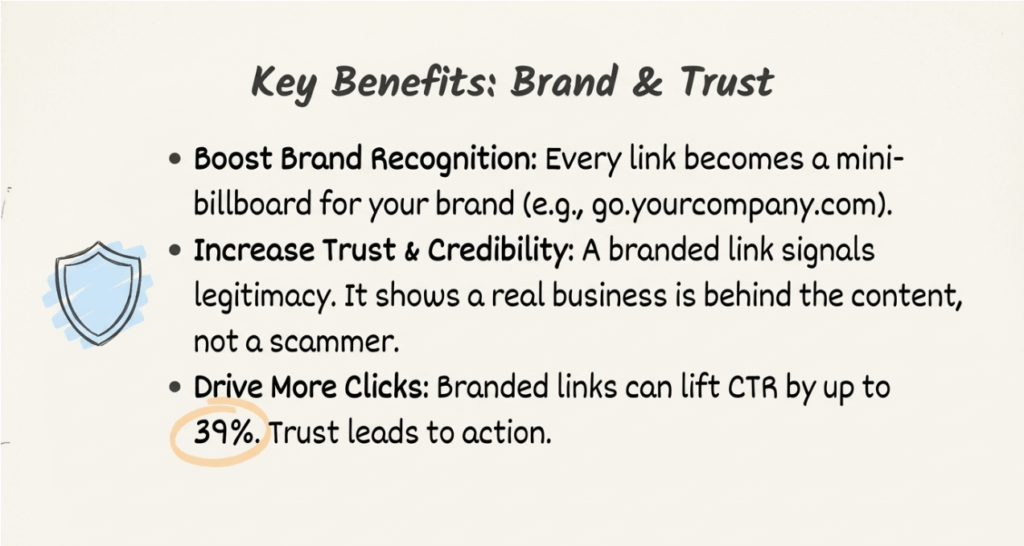
1. Boost Brand Recognition
Every link you share is a branding opportunity. When your links consistently display your brand name, you reinforce recognition with every email, social post, and advertisement.
Compare bit.ly/abc123 to go.yourcompany.com/demo. The second link works as a mini billboard. Recipients see your brand name before they even click. Over time, this repeated exposure builds familiarity and strengthens your market position.
2. Increase Click-Through Rates
Branded links can increase click-through rate by up to 39% compared to generic shortened URLs.That’s not a minor improvement. For a campaign that normally gets 1,000 clicks, you could see 1,390 clicks just by switching to branded links.
Why the difference? Trust. When people recognize where a link leads, they’re more likely to click. A link that says shop.nike.com/new-arrivals tells you exactly what you’ll find.A link that says bit.ly/x7k2m could lead anywhere.
3. Build Trust and Credibility
According to the Edelman Trust Barometer, 81% of consumers need to trust a brand before making a purchase. Every touchpoint either builds or erodes that trust, including your links.
Generic shortened URLs trigger skepticism. They’re commonly associated with spam, phishing attempts, and clickbait. When your marketing emails contain bit.ly links, you’re borrowing someone else’s (questionable) reputation instead of building your own.
Vanity URLs signal legitimacy. They show recipients that a real business stands behind the link, not a scammer hiding behind a URL shortener.
4. Improve Campaign Tracking
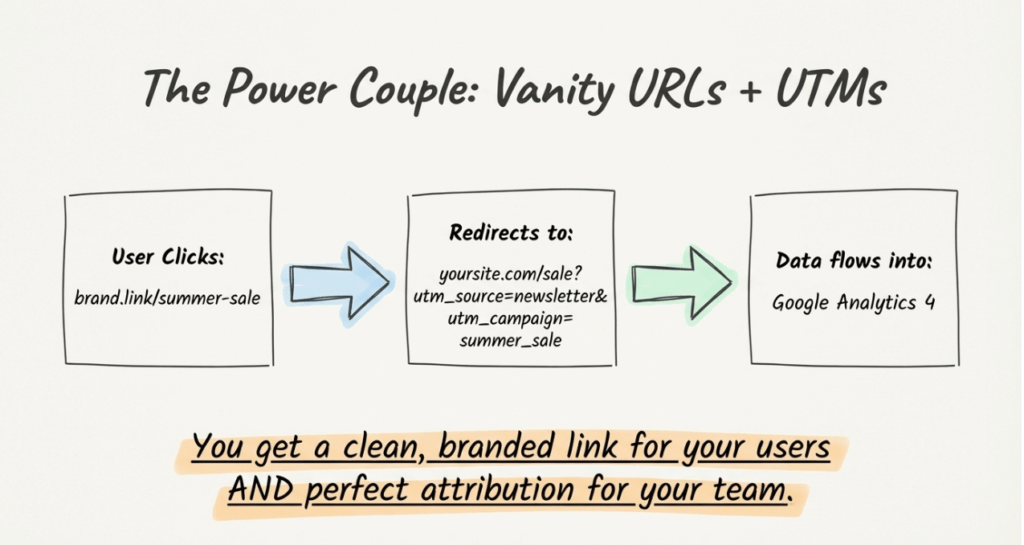
Vanity URLs work seamlessly with UTM parameters to give you complete campaign attribution. You can track exactly which emails, social posts, or ads drive traffic and conversions.
Instead of guessing which channels perform best, you get concrete data:
- Which email in your welcome sequence drives the most clicks
- Whether LinkedIn or Twitter sends more engaged traffic
- Which ad creative generates the highest conversion rate
This tracking flows directly into Google Analytics 4, giving you a unified view of campaign performance across all channels.
5. Enable Better link management
Links break. Destinations change. Products get discontinued. With regular URLs scattered across your marketing materials, updating a dead link means tracking down every place you used it.
Vanity URLs give you centralized control. Change the destination once, and every instance of that link automatically redirects to the new page. No hunting through old emails. No broken links in your print materials.
According to an Ahrefs study, 66.5% of links from 2013 to 2022 have “rotted,” meaning they no longer work. Vanity URLs with redirect management help you avoid becoming part of that statistic.
6. Enhance Offline Marketing
Print ads, billboards, business cards, event signage: offline marketing demands short, memorable URLs.Nobody’s going to type yoursite.com/products/category/limited-edition-summer-collection-2025 from a poster.
Vanity URLs bridge the gap between offline and online marketing. brand.com/summer It is easy to remember, easy to type, and easy to track. You can even create QR codes that link to your vanity URLs, capturing scan data for offline campaign attribution.
7. Strengthen SEO Signals
While Google indexes the destination page (not the vanity URL), branded links indirectly support your SEO efforts. Higher click-through rates from search results signal relevance to Google .More traffic means more engagement signal s.And memorable links get shared more often, potentially earning backlinks.
Vanity URLs also help you maintain clean URL structures. Instead of sharing parameter-heavy links that look spammy, you share clean, professional URLs that people are more likely to link to and share.
How to Create a Vanity URL (5 Steps)
Setting up vanity URLs is simpler than most marketers expect. Here’s the complete process:
Step 1: Choose Your Custom Domain
First, decide on the branded domain you’ll use for your short links. You have two main options:
Subdomain of your main site: link.yourcompany.com or go.yourcompany.com
- Pros: No additional domain purchase, clearly connected to your brand
- Cons: Slightly longer than a dedicated short domain
Dedicated short domain: yrbrand.co or brandly.link
- Pros: Shorter, can be creative with extensions (.co, .link, .io)
- Cons: Requires purchasing and managing a separate domain
Popular format examples:
link.yourcompany.comgo.yourcompany.comtry.yourcompany.comget.yourcompany.com
Keep it short, memorable, and clearly connected to your brand.
Step 2: Select a Link Management Platform
You need a platform to create, manage, and track your vanity URLs.Look for these features:
- Custom domain support: Connect your own branded domain
- UTM parameter integration: Add tracking codes automatically
- Click analytics: Monitor performance in real-time
- Team collaboration: Share templates and maintain naming consistency
- Bulk creation: Generate multiple links quickly
- GA4 integration: Sync data with your analytics platform
linkutm offers all these features with an emphasis on UTM tracking and campaign attribution. You can use the UTM link builder to create properly tagged vanity URLs in seconds.
Step 3: Connect Your Domain
Once you’ve chosen a platform, connect your custom domain:
1. Add your domain in the platform settings
2 .Update your DNS records (usually a CNAME record pointing to the platform)
3.Wait for DNS propagation (typically 15-60 minutes)
4.Verify the connection
Most platforms handle SSL certificates automatically, ensuring your vanity URLs work over secure HTTPS connections.
Step 4: Create Your First Vanity URL
With your domain connected, create your first vanity URL :
1. Enter your destination URL (the full page you want to link to)
2. Choose a descriptive slug (e.g., /summer-sale, /podcast-ep-42, /demo)
3. Preview the final vanity URL
4. Save and test the redirect
Make your slug descriptive but concise. /summer-sale tells users what to expect. /x7k2m tells them nothing.
Step 5: Add UTM Parameters for Tracking
Here’s where many marketers stop, missing out on crucial campaign data. Add UTM parameters to track exactly where your traffic comes from.
A complete vanity URL with UTM tracking looks like this:
Vanity URL: brand.link/summer-sale
Destination with UTM: yoursite.com/summer-collection? utm_source=newsletter&utm_medium=email&utm_campaign=summer_sale_2025
When someone clicks your vanity URL, they’re redirected to the full destination URL, including all UTM parameters. This data flows into GA4, showing you exactly which campaigns drive results.
Following UTM best practices ensures your data stays clean and actionable.
Vanity URL Best Practices
Creating vanity URLs is easy. Creating effective vanity URLs requires attention to these best practices:
Keep it short: Aim for 8-15 characters in your slug. brand.link/sale beats brand.link/our-amazing-summer-sale-event-2025.
Use descriptive slugs: /webinar-signup tells users what they’ll find. /link7 tells them nothing.
Maintain consistent naming conventions: Decide on a format and stick with it. If you use hyphens in one URL (summer-sale), use hyphens in all of them. Consistency prevents confusion and keeps your analytics clean.
Include relevant keywords when possible: /podcast-marketing-guide is more informative than /guide1 and can help users understand the content at a glance.
Test before deploying: Always click your vanity URL before sharing i t.Verify it redirects to the correct destination with the right UTM parameters.
Track performance: Use analytics to monitor which vanity URLs get the most clicks and conversions. This data informs future campaign decisions.
Create templates for recurring campaigns: If you send a monthly newsletter, create a template that generates consistent vanity URLs like brand.link/newsletter-jan automatically.
Common Vanity URL Mistakes to Avoid
Even experienced marketers make these vanity URL errors:
Using special characters or numbers randomly: brand.link/sale!2025#1 Looks unprofessional and can cause technical issues. Stick to letters, numbers, and hyphens.
Creating URLs that are too long: The whole point of a vanity URL is brevity. brand.link/our-complete-guide-to-summer-fashion-trends-for-2025 defeats the purpose.
Inconsistent naming across campaigns: Using summer_sale for one campaign and SummerSale Another creates fragmented analytics data. Pick a convention (lowercase, hyphens) and enforce it across your team.
Not tracking link performance: A vanity URL without analytics is a vanity project. Always add UTM parameters and monitor which links drive actual results.
Forgetting about mobile users: Test your vanity URLs on mobile devices. Ensure the destination pages are mobile-friendly and load quickly.
Reusing slugs carelessly: If /sale pointed to your Black Friday promotion, don’t reuse it for your summer sale without updating the destination. Old links floating around the internet will redirect to the wrong page.
Skipping the preview check: Some platforms let you customize the link preview (title, description, image) that appears when sharing on social media. Customize these for maximum click-through.
Vanity URL Examples by Industry
Different industries use vanity URLs in different ways. Here are practical examples:
E-commerce
shop.nike.com/air-max– Product launchdeal.amazon.com/prime-day– Promotional eventbrand.link/black-friday– Seasonal sale
E-commerce brands use vanity URLs for product launches, flash sales, and seasonal campaigns. The goal isto driveg immediate clicks and purchases.
SaaS Companies
try.hubspot.com/demo– Demo requestsget.slack.com/free– Free trial signupsbrand.link/webinar– Event registration
SaaS companies focus on conversion actions: demos, trials, and webinar signups. Vanity URLs make these CTAs memorable and trackable.
Events and Conferences
attend.salesforce.com/dreamforce– Conference registrationbrand.link/workshop-nyc– Local event signuprsvp.company.com/launch-party– Exclusive invitations
Event marketers need memorable URLs for promotional materials, email invitations, and on-site signage.
Social Media Marketing
brand.co/instagram– Bio linklink.company.com/tiktok-offer– Platform-specific promotionbrand.link/linkedin-guide– Content download
Social media managers use vanity URLs to track social media ROI and understand which platforms drive results.
Email Marketing
brand.link/newsletter– General newsletter CTAbrand.link/welcome-offer– New subscriber promotionbrand.link/survey– Feedback collection
Email marketers rely on vanity URLs to track click-through rates across different campaigns and understand subscriber engagement.
How Vanity URLs Work with UTM Tracking
Vanity URLs become powerful marketing tools when combined with UTM parameters. Here’s why this combination matters.
The Complete Attribution Picture
A vanity URL alone tells you how many people clicked. Add UTM parameters, and you know:
- Which campaign drove the click (utm_campaign)
- Which channel it came from (utm_source)
- What type of link it was (utm_medium)
- Which specific element was clicked (utm_content)
This data flows into Google Analytics 4, giving you complete visibility into campaign performance.
Example: Email Campaign Tracking
Let’s say you’re promoting a summer sale through your email newsletter.
Vanity URL: brand.link/summer-sale
Full destination with UTM parameters:yoursite.com/summer-collection? utm_source=newsletter&utm_medium=email&utm_campaign=summer_sale_2025&utm_content=hero_button
When subscribers click your vanity URL, they’re redirected to the full destination, including all tracking parameters. In GA4, you can now see:
- How many conversions came from this specific email campaign
- Which link in the email performed best (hero button vs. text link)
- How email traffic compares to other channels
Automating UTM Integration
Manually adding UTM parameters to every link is tedious and error-prone. Tools like linkutm automate this process:
1. Create a vanity URL template with your standard UTM structure
2. Generate new links that automatically include proper tracking
3. Enforce naming conventions so your data stays consistent
4. View click analytics alongside your GA4 campaign reports
This automation eliminates the spreadsheet chaos that plagues most marketing teams’ UTM management.
Vanity URL FAQs
What is the difference between a vanity URL and a regular URL?
A vanity URL is a customized, branded short link that redirects to a longer destination URL. A regular URL is the actual web address of a page. Vanity URLs offer better branding, memorability, and tracking capabilities while keeping links short and professional.
Do vanity URLs help with SEO?
Vanity URLs don’t directly impact SEO since Google indexes the destination page, not the redirect. However, they indirectly support SEO by increasing click-through rates, encouraging more shares, and helping you track which content drives the most engagement.
How much does a vanity URL cost?
Costs vary by platform and scale. Many link management tools offer free tiers with limited features. Paid plans typically range from $9-79/month depending on link volume, team size, and advanced features. You may also need to purchase a custom domain ($10-50/year for most extensions).
Start Using Vanity URLs Today
Vanity URLs transform ordinary links into brand-building, trust-generating, click-driving marketing assets. They’re not just cosmetic improvements. They deliver measurable results: up to 39% higher click-through rates, better campaign tracking, and stronger brand recognition with every share.
Here’s your action plan:
- Choose a custom domain that reflects your brand
- Select a link management platform with UTM integration and analytics
- Connect your domain and create your first vanity URL
- Add UTM parameters to track campaign performance
- Monitor results and optimize based on data
Ready to ditch generic links and start building brand trust with every click? linkutm makes it easy to create vanity URLs with built-in UTM tracking, team collaboration, and GA4 integration. Check out linkutm pricing to find the right plan for your marketing needs.
Your links deserve better than bit.ly/x7k2m. Your brand does too.