What is UTM Tracking? Complete Beginner Guide
Your GA4 reports show traffic from “direct / none” and you have no idea which email, social post, or ad actually drove those clicks. Sound familiar?
You’re not alone. According to HubSpot’s 2024 State of Marketing Report, 41% of marketers say attribution is their biggest challenge when trying to prove ROI. The problem isn’t your marketing. It’s that you’re flying blind without proper tracking.
This is where UTM tracking becomes your secret weapon.
UTM tracking transforms vague “where did this traffic come from?” guesses into crystal-clear campaign attribution. Instead of wondering if that Instagram post or email newsletter drove signups, you’ll know exactly which campaigns deliver results.
In this guide, you’ll learn what UTM tracking is, how it works, and how to implement it correctly from day one. No technical background required. By the end, you’ll have the knowledge to track every marketing campaign with precision.
What is UTM Tracking?
UTM tracking is a method of adding special tags to your URLs that tell analytics platforms exactly where your website traffic originates. These tags, called UTM parameters, pass information to Google Analytics 4 (and other analytics tools) so you can see which specific campaigns, channels, and content pieces drive clicks, conversions, and revenue.
The Simple Definition
UTM stands for “Urchin Tracking Module,” named after Urchin Software Corporation, the company Google acquired in 2005 that became the foundation of Google Analytics. While the name sounds technical, the concept is straightforward: UTM parameters are small snippets of text added to the end of any URL to identify traffic sources.
Here’s what a UTM-tagged URL looks like:
https://yoursite.com/landing-page?utm_source=newsletter&utm_medium=email&utm_campaign=spring_sale
Everything after the “?” contains the UTM parameters. When someone clicks this link, GA4 records exactly where that visitor came from (newsletter), what type of channel it was (email), and which campaign it belongs to (spring_sale).
How UTM Tracking Works
The process is simple:
- You create a URL with UTM parameters attached
- Someone clicks the link from your email, social post, or ad
- Their browser sends the UTM data to your analytics platform
- GA4 records the information in your campaign reports
- You analyze performance to see what’s working
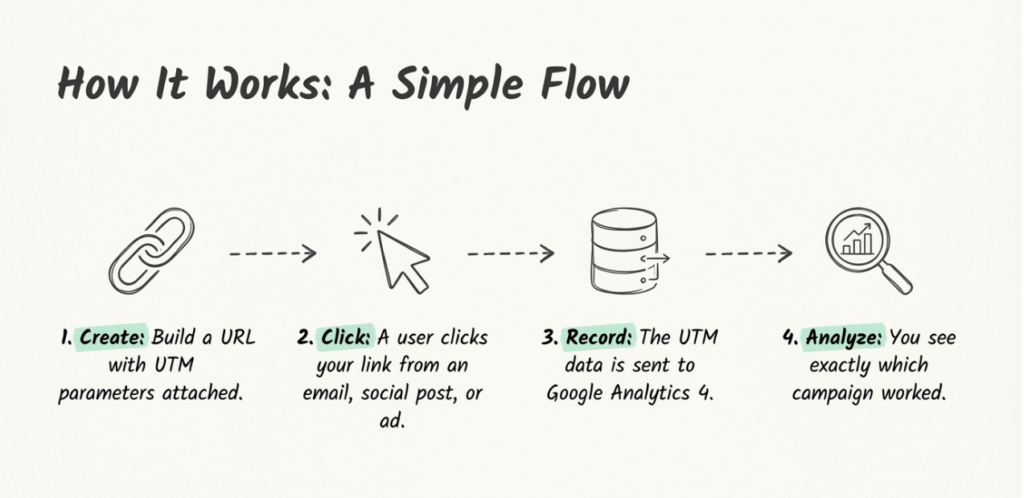
Without UTM tracking, that same click might show up as “direct” traffic in GA4, giving you zero insight into which campaign drove it. With UTM tracking, you see the complete picture.
Think of UTM parameters as name tags for your links. Just like name tags help you identify people at a conference, UTM parameters help you identify where every visitor comes from.
The 5 UTM Parameters Explained
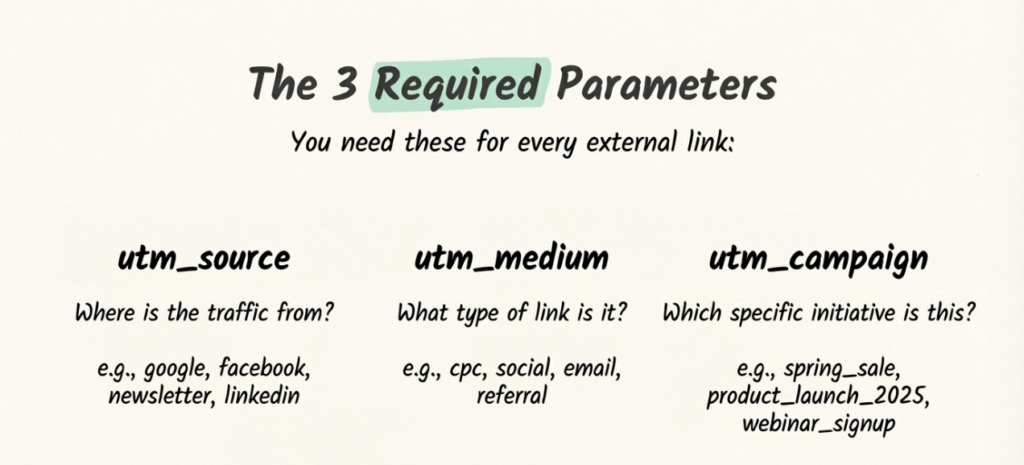
There are five standard UTM parameters you can use to track your campaigns. Three are essential for every link. Two are optional but valuable for deeper analysis.
utm_source (Required)
The source parameter identifies where your traffic originates. This is the specific platform, website, or sender that sent the traffic your way.
Examples:
- utm_source=facebook
(traffic from Facebook) - utm_source=newsletter
(traffic from your email newsletter) - utm_source=google
(traffic from Google) - utm_source=linkedin
(traffic from LinkedIn)
Think of source as answering the question: “Which website or platform sent this visitor?”
utm_medium (Required)
The medium parameter identifies the marketing channel type. While source tells you the specific platform, medium tells you the category of traffic.
Examples:
- utm_medium=email
(came from an email campaign) - utm_medium=social
(came from organic social media) - utm_medium=cpc
(came from paid search/cost-per-click) - utm_medium=referral
(came from another website's link)
Think of medium as answering: “What type of marketing channel is this?”
utm_campaign (Required)
The campaign parameter identifies your specific marketing campaign or promotion. This is where you name your individual initiatives so you can compare their performance.
Examples:
- utm_campaign=spring_sale
(spring promotional campaign) - utm_campaign=product_launch_2025
(new product launch) - utm_campaign=black_friday
(Black Friday promotion) - utm_campaign=webinar_signup
(webinar registration campaign)
Think of campaign as answering: “Which marketing initiative is this part of?”
utm_term (Optional)
The term parameter is traditionally used to identify paid search keywords. It’s helpful when running PPC campaigns and you want to track which specific keywords drove clicks.
Examples:
- utm_term=running+shoes
(paid keyword) - utm_term=email+marketing+software
(long-tail keyword)
For non-PPC campaigns, some marketers use term to segment audiences or identify email list segments like utm_term=vip_subscribers.
utm_content (Optional)
The content parameter differentiates similar links within the same campaign. It’s particularly useful for A/B testing or when you have multiple calls-to-action in one email or page.
Examples:
- utm_content=header_button
(CTA in email header) - utm_content=footer_link
(link in footer) - utm_content=blue_banner
(blue version of ad creative) - utm_content=video_thumbnail
(clicked on video image)
Think of content as answering: “Which specific link or creative element was clicked?”
Quick Reference Table
| Parameter | Required? | Purpose | Example Value |
|---|---|---|---|
| utm_source | Yes | Identifies the platform/sender | facebook, newsletter, google |
| utm_medium | Yes | Identifies the channel type | email, social, cpc, referral |
| utm_campaign | Yes | Names the specific campaign | spring_sale, product_launch |
| utm_term | No | Tracks paid keywords or segments | running+shoes, vip_list |
| utm_content | No | Differentiates links/creatives | header_cta, blue_banner |
For most campaigns, you’ll use source, medium, and campaign. Add term and content when you need deeper granularity.
Why UTM Tracking Matters for Marketers
Understanding what UTM tracking is only matters if you understand why it transforms your marketing. Here’s the real business impact.
The Attribution Problem
Without UTM tracking, your GA4 reports become a guessing game. Traffic shows up as “direct” when it should be attributed to your email campaign. Social media clicks blend together because you can’t distinguish between organic posts and paid ads. You spend hours in spreadsheets trying to piece together which campaigns actually work.
Research from Improvado found that over 30% of marketing campaigns don’t use UTM markup at all. These companies are flying blind, unable to accurately attribute revenue or analyze what’s actually driving results.
Real Business Impact
The numbers speak for themselves:
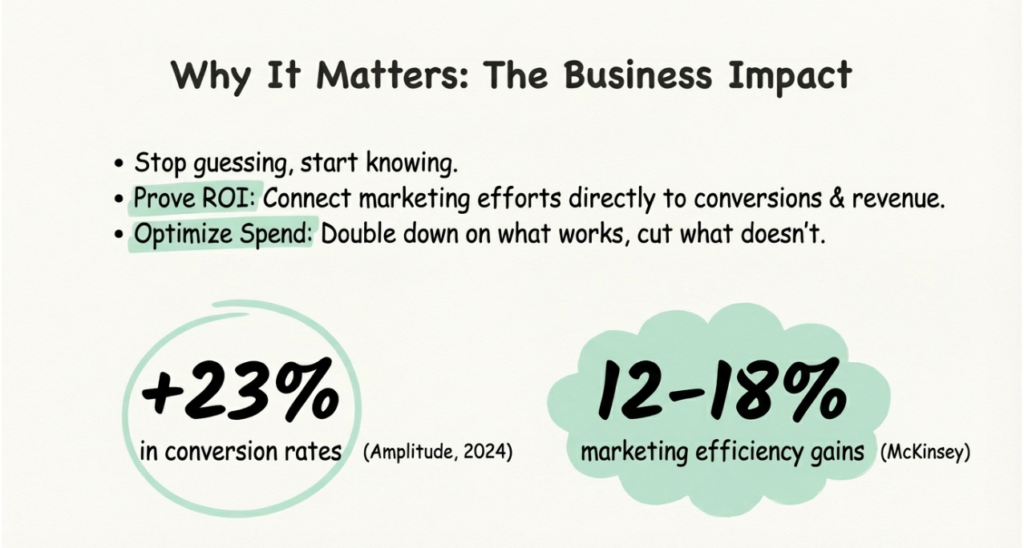
- 23% increase in conversion rates: Companies implementing advanced UTM tracking and analysis see significant conversion improvements, according to Amplitude’s 2024 research
- 12-18% marketing efficiency gains: McKinsey found that optimized campaign tracking directly improves how effectively you spend your budget
- 74% of high-growth companies use multi-touch attribution: Growth-focused organizations invest in proper tracking because they know it drives revenue
When you can see exactly which campaigns drive results, you stop wasting money on channels that don’t perform. You double down on what works. You prove ROI to stakeholders with confidence instead of guesswork.
What Happens Without UTM Tracking
The consequences of skipping UTM parameters are real:
- Messy GA4 reports: Traffic shows as “direct” or “not set,” making analysis impossible
- Wasted ad spend: You can’t cut underperforming channels if you don’t know which ones underperform
- No proof of ROI: When leadership asks which campaign drove last month’s sales spike, you can’t answer
- Team confusion: Without standards, everyone tags links differently, fragmenting your data
- Missed optimization opportunities: You can’t A/B test what you can’t measure
How to Create UTM Tracking Links
A Full UTM Tracking Setup, Start to Finish
Creating UTM-tagged links is straightforward once you know the options. Here are the three main approaches.
Method 1: UTM builder Tools
The easiest way to create UTM links is with a dedicated builder tool. These eliminate manual errors and ensure consistent formatting.
Google Campaign URL Builder (Free, Basic)
Google offers a free tool where you enter your URL and parameters, and it generates the tagged link. It works, but it’s manual, doesn’t save your links, and offers no team collaboration.
linkutm (Organized, Team-Ready)
Tools like linkutm’s UTM builder automate the entire process with reusable templates, automatic naming convention enforcement, and organized link management. Instead of hunting through spreadsheets for a link you created three months ago, you find any campaign link in seconds.
The difference becomes clear when you’re managing dozens of campaigns across multiple channels. Manual tools create chaos. Dedicated platforms create clarity.
Method 2: Manual Creation
You can build UTM links manually by adding parameters directly to your URL. Here’s the structure:
https://yoursite.com/page?utm_source=SOURCE&utm_medium=MEDIUM&utm_campaign=CAMPAIGN
Rules for manual creation:
- Start with ?
after the base URL - Separate parameters with &
- Use =
between parameter name and value - Never use spaces (use underscores or hyphens)
- Always use lowercase for consistency
Manual creation works for one-off links, but it’s error-prone at scale and creates no record of your links for future reference.
Step-by-Step Example
Let’s create a UTM link for a summer sale email campaign:
Starting URL: https://yourstore.com/sale
Parameters to add:
- Source: newsletter (it’s from your email list)
- Medium: email (the channel type)
- Campaign: summer_sale_2025 (the specific promotion)
- Content: hero_button (the main CTA button)
Final UTM Linkhttps://yourstore.com/sale?utm_source=newsletter&utm_medium=email&utm_campaign=summer_sale_2025&utm_content=hero_button
When someone clicks this link, GA4 records all four parameters. You can then see exactly how many clicks, sessions, and conversions came from that specific email button.
UTM Naming Conventions: The Foundation of Clean Data
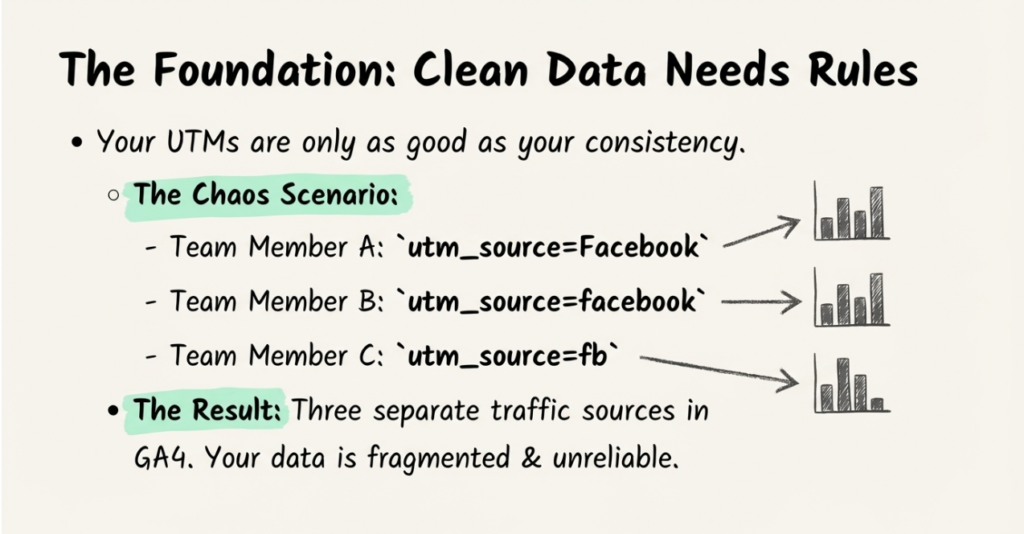
Your UTM tracking is only as good as your naming consistency. One typo can fragment your data across multiple entries in GA4.
Why Naming Conventions Matter
Consider this scenario: Three team members create UTM links for Facebook campaigns.
- Person A uses utm_source=Facebook
- Person B uses utm_source=facebook
- Person C uses utm_source=fb`
In GA4, these appear as three separate traffic sources. Your Facebook data is now split across three entries, making accurate reporting impossible.
According to SEMrush’s 2024 research, 67% of marketing teams use UTM parameters, but only 58% have a documented naming strategy. That gap explains why so many teams struggle with messy analytics.
Recommended Naming Rules
Follow these conventions to keep your data clean:
- Always use lowercase: “facebook” not “Facebook” or “FACEBOOK”
- Replace spaces with underscores or hyphens: “spring_sale” not “spring sale”
- Be specific but concise: “email_welcome_series” tells you more than just “email”
- Use consistent abbreviations: Pick “fb” or “facebook” and stick with it
- Document everything: Create a shared reference guide your team can access
Example Naming Convention Template
| Parameter | Format Rule | Examples |
|---|---|---|
| utm_source | Platform name, lowercase | facebook, linkedin, newsletter |
| utm_medium | Channel type, lowercase | email, social, cpc, referral |
| utm_campaign | initiative_year or initiative_month | spring_sale_2025, webinar_jan |
| utm_content | element_position | header_cta, sidebar_banner |
Platforms like linkutm enforce naming conventions automatically. Instead of relying on team discipline, the tool prevents inconsistent values from being created in the first place.
Where to See UTM Data in Google Analytics 4
Once your UTM-tagged links are live and receiving clicks, here’s where to find the data in GA4.
Traffic Acquisition Report
Navigate to: Reports > Acquisition > Traffic Acquisition
This report shows all traffic sources including your UTM-tagged campaigns. You’ll see:
- Session source / medium combinations
- Total sessions, users, and engagement metrics
- Conversion data if you’ve set up goals
Filter by “Session campaign” to see specific campaign performance.
Campaign Report
For campaign-specific analysis, use the User Acquisition report and add “Session campaign” as a secondary dimension. This shows how each campaign performs across key metrics like:
- New users acquired
- Engagement rate
- Average session duration
- Conversions
Custom Explorations
For deeper analysis, GA4’s Explorations feature lets you build custom reports combining UTM dimensions with any metrics you care about.
Create a new Exploration and add these dimensions:
- Session source
- Session medium
- Session campaign
- Session manual ad content (this is utm_content)
Combine with metrics like sessions, conversions, and revenue to build comprehensive campaign performance dashboards.
Common UTM Tracking Mistakes (And How to Avoid Them)
Even experienced marketers make these UTM tracking errors. Here’s how to avoid them.
Mistake 1: Inconsistent Naming
The problem: Using “Facebook” in one campaign and “facebook” in another creates separate entries in GA4.
The solution: Establish and document naming conventions. Better yet, use a tool that enforces consistent naming automatically. No more typos fragmenting your data.
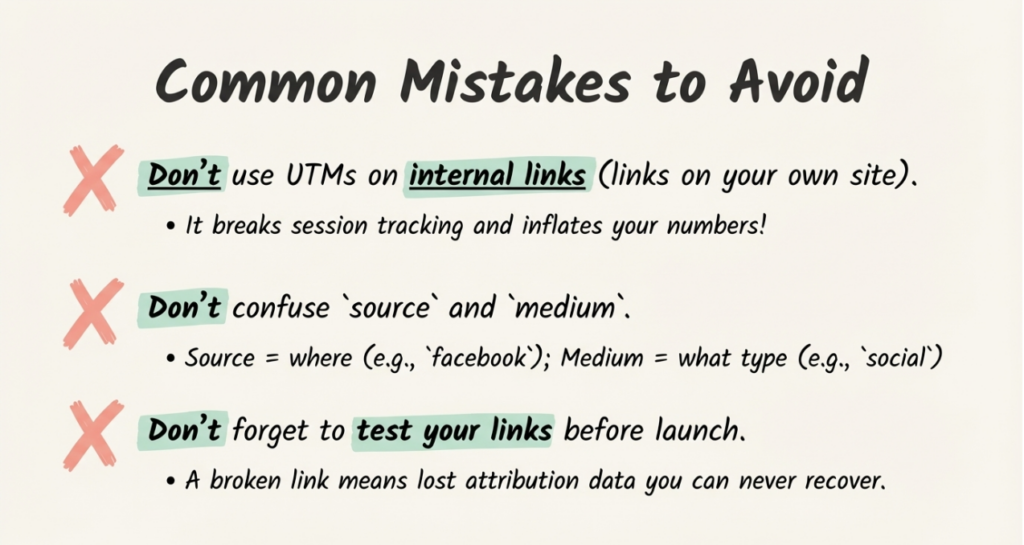
Mistake 2: Using UTMs on Internal Links
The problem: Adding UTM parameters to links between pages on your own website breaks session tracking. Each internal UTM link starts a “new” session in GA4, making your data unreliable.
The solution: Only use UTM parameters on external links pointing to your site. For internal navigation, use event tracking instead.
Mistake 3: Confusing Source and Medium
The problem: Using “email” as a source or “newsletter” as a medium reverses their meanings and creates inconsistent data.
The solution: Remember: Source = the specific platform (newsletter, facebook, google). Medium = the channel type (email, social, cpc). Keep them straight.
Mistake 4: Not Testing Before Launch
The problem: Sending a campaign with broken or mistagged UTM links means losing attribution data you can never recover.
The solution: Always click your UTM links before launching a campaign. Check that they load correctly and that parameters appear properly in GA4’s real-time reports.
Mistake 5: Lack of Documentation
The problem: Without a shared system, different team members create different naming conventions. Your data becomes fragmented across inconsistent values.
The solution: Create a UTM strategy document your team can reference. Include approved values for source, medium, and campaign naming. For teams, a platform like linkutm with shared templates and enforced rules eliminates this problem entirely.
UTM Tracking vs. Auto-Tagging: Which to Use?
If you run Google Ads, you’ve probably heard of auto-tagging. Here’s when to use each approach.
When to Use UTM Parameters
UTM tracking is ideal for:
- Cross-platform campaigns: Social media, email, affiliate links
- Non-Google advertising: Facebook Ads, LinkedIn Ads, TikTok Ads
- Organic social posts: Track social media performance with precision
- Email marketing: Tag every email link for complete attribution
- Partner and affiliate links: Track which partners drive conversions
- Offline-to-online: QR codes on print materials
When to Use Auto-Tagging
Google Ads auto-tagging (gclid) is best for:
- Google Ads campaigns: Automatic, comprehensive tracking
- Google-only analysis: When you only need Google Ads data in GA4
- Detailed cost data: Auto-tagging passes cost information that UTMs don’t
Using Both Together
You can use both auto-tagging and UTM parameters simultaneously. In GA4 settings, enable “Allow manual tagging to override auto-tagging” if you want your UTM values to take priority.
For most marketers, the answer is: use auto-tagging for Google Ads, use UTM parameters for everything else.
Getting Started with UTM Tracking
Ready to implement UTM tracking? Here’s your action plan.
Your First UTM Link
- Choose a campaign you’re about to launch (email, social post, or ad)
- Identify your source, medium, and campaign values
- Build your UTM link using linkutm’s free UTM builder or Google’s Campaign URL Builder
- Replace the regular URL in your campaign with the tagged version
- Launch and monitor results in GA4
Next Steps
Once you’ve created your first UTM links:
- Document your naming conventions: Create a shared reference for source, medium, and campaign values
- Train your team: Make sure everyone knows how to create consistent UTM links
- Set up GA4 reports: Build dashboards that show campaign performance at a glance
- Review and optimize: Check your UTM data weekly to see what’s working
For teams managing multiple campaigns, consider a dedicated UTM management platform. The time saved on link creation, organization, and consistency enforcement pays for itself quickly.
Conclusion
UTM tracking transforms marketing from guesswork into data-driven decision making. Instead of wondering which campaigns drive results, you know exactly what’s working.
Key takeaways:
- UTM parameters are tags added to URLs that identify traffic sources in GA4
- The five parameters (source, medium, campaign, term, content) provide complete attribution
- Consistent naming conventions are essential for clean, reliable data
- Testing links before launch prevents lost attribution data
- The right tools eliminate spreadsheet chaos and enforce best practices automatically
41% of marketers struggle with attribution. You don’t have to be one of them.
Start tagging your campaign links today. Within weeks, you’ll have clear insights into which channels drive clicks, which campaigns convert, and where to invest your budget for maximum ROI.
Ready to ditch the spreadsheets and track campaigns the smart way? Try linkutm’s free UTM builder and see how organized campaign tracking transforms your marketing analytics.