What is a URL Slug? Complete Guide to SEO-Friendly URLs
Every URL on your website contains a hidden opportunity to improve your search rankings and build trust with your audience. That opportunity? The URL slug.
Most marketers spend hours crafting perfect headlines and optimizing meta descriptions. But they overlook the small string of text at the end of their URLs that search engines and users both rely on to understand what a page is about.
A poorly chosen slug can make your content look unprofessional, confuse search engines, and even hurt your click-through rates. A well-crafted slug does the opposite: it signals relevance, builds trust, and gives you a slight edge in competitive search results.
In this guide, you’ll learn exactly what a URL slug is, why it matters for SEO, and how to create slugs that help your content rank higher and get more clicks. We’ll cover best practices, common mistakes, and practical examples you can apply immediately to your website.
What is a URL Slug?
A URL slug is the part of a web address that comes after the domain name and identifies a specific page in human-readable format.
Let’s break down a typical URL to see where the slug fits:
https://www.example.com/blog/what-is-url-slug
 └─────────────┘ └──┘ └──────────────┘
 Domain Path Slug
In this example, what-is-url-slugis the slug. It’s the unique identifier that tells both users and search engines what this particular page is about.
The term “slug” comes from traditional newspaper publishing, where it referred to a short name given to an article for internal tracking. In the digital world, slugs serve a similar purpose: they’re shorthand identifiers that describe page content.
You might also hear URL slugs called:
- Permalinks (especially in WordPress)
- URL paths (though technically the path includes everything after the domain)
- Page slugs
- SEO slugs
Regardless of what you call them, the concept is the same: a concise, descriptive string that identifies your page.
Good vs. Bad URL Slugs
The difference between effective and ineffective slugs is immediately obvious:
Good slugs:
- example.com/blog/email-marketing-tips
- example.com/products/wireless-headphones
- example.com/guide/utm-parameters
Bad slugs:
- example.com/blog/post-id-7834521
- example.com/products/item?id=283&cat=audio
- example.com/page/10-amazing-email-marketing-tips-you-need-to-know-in-2026
Good slugs are short, descriptive, and keyword-focused. Bad slugs are either meaningless (random IDs) or excessively long and cluttered.
Why URL Slugs Matter for SEO
You might wonder: does changing a few words in a URL really make a difference? The short answer is yes, though it’s more nuanced than you might think.
Search Engine Ranking Factor
Google’s John Mueller has confirmed that words in URLs are a ranking factor. However, he’s also been clear that it’s a “very very lightweight” one.
What does this mean practically? Don’t expect to jump from page five to page one just by optimizing your slugs. But in competitive search results where multiple factors are nearly equal, a well-optimized slug can provide a small advantage.
An analysis of 11.8 million Google search results by Backlinko found that shorter URLs tend to correlate with higher rankings. Specifically:
- Position 1 URLs are on average 9.2 characters shorter than URLs in position 10
- The average URL length for a top 10 result is 66 characters
- Pages ranking in positions 1-3 had an average URL length of 50 characters, compared to 62 characters for positions 7-10
This doesn’t mean short URLs cause higher rankings. But it does suggest that concise, focused URLs are associated with well-optimized content.
User Experience and Trust
Beyond search algorithms, slugs directly impact how users perceive your links.
When someone sees a URL in search results, social media, or an email, they make instant judgments about whether to click. A clear, descriptive slug tells them exactly what to expect:
- yoursite.com/blog/how-to-track-email-campaigns
- Clear topic, professional appearance - yoursite.com/blog/p=12847
- Mysterious, potentially spammy
Research shows that users are more likely to click links they understand. In an era of phishing attempts and suspicious links, readable URLs signal legitimacy.
Click-Through Rate Impact
Your slug appears in multiple places:
- Google search results (below the title)
- Social media previews
- Email links
- Browser address bars
- Shared links in chat and messaging apps
In each case, a descriptive slug reinforces what your content is about and encourages clicks. It’s essentially free advertising for your page topic.
Mobile and Social Considerations
On mobile devices, URLs are often truncated. A long slug might display as:
yoursite.com/blog/the-ultimate-comp…
That truncation cuts off the most important information. Short slugs display fully across devices and platforms, maintaining their descriptive value.
AI Search Implications
With the rise of AI-powered search experiences like Google’s AI Mode and ChatGPT-powered search, clear URL structures are becoming more important. AI systems parse URLs to understand page content and context. Descriptive slugs help these systems accurately categorize and recommend your content.
URL Slug vs. Other URL Components
Understanding where slugs fit in the broader URL structure helps you optimize effectively.
A complete URL contains several parts:
| Component | Example | Purpose |
|---|---|---|
| Protocol | https:// | Secure connection type |
| Subdomain | www. or blog. | Section of the domain |
| Domain | example.com | Your website’s address |
| Path | /blog/ | Folder or category structure |
| Slug | url-slug-guide | Specific page identifier |
| Parameters | ? utm_source=email | Tracking or dynamic data |
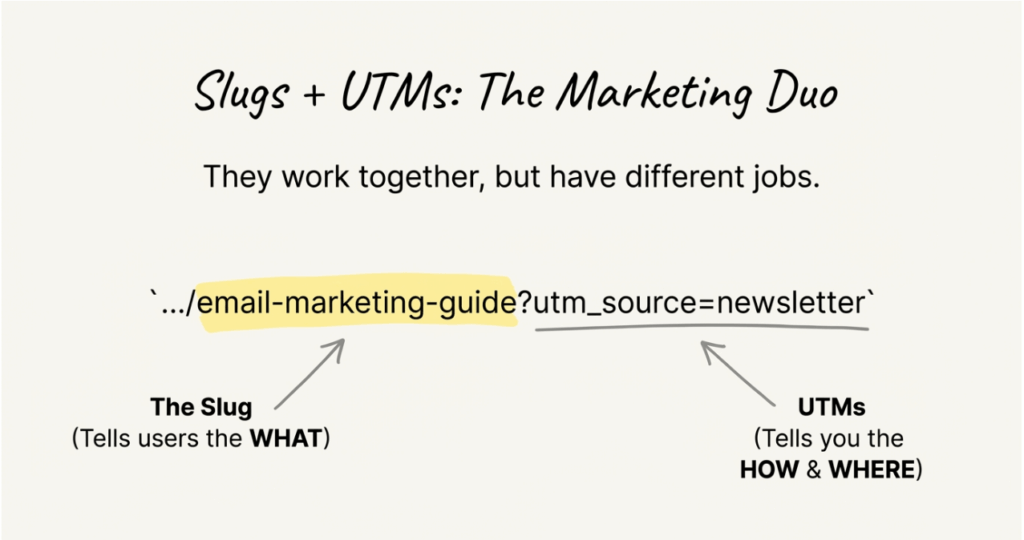
The slug is specifically the final descriptive portion that identifies a unique page. It’s separate from:
- Folder paths like /blog/
or/products/that organize content - Query parameters like ? ref=newsletter
that pass data - Fragments like #section-2
that link to page sections
When optimizing URLs, you have the most control over slugs. Domain names are fixed, paths follow your site architecture, but slugs can be customized for each piece of content.
How to Create SEO-Friendly URL Slugs
Creating effective slugs isn’t complicated, but it requires intentional choices. Follow these best practices to optimize every URL you create.
Keep Slugs Short and Descriptive
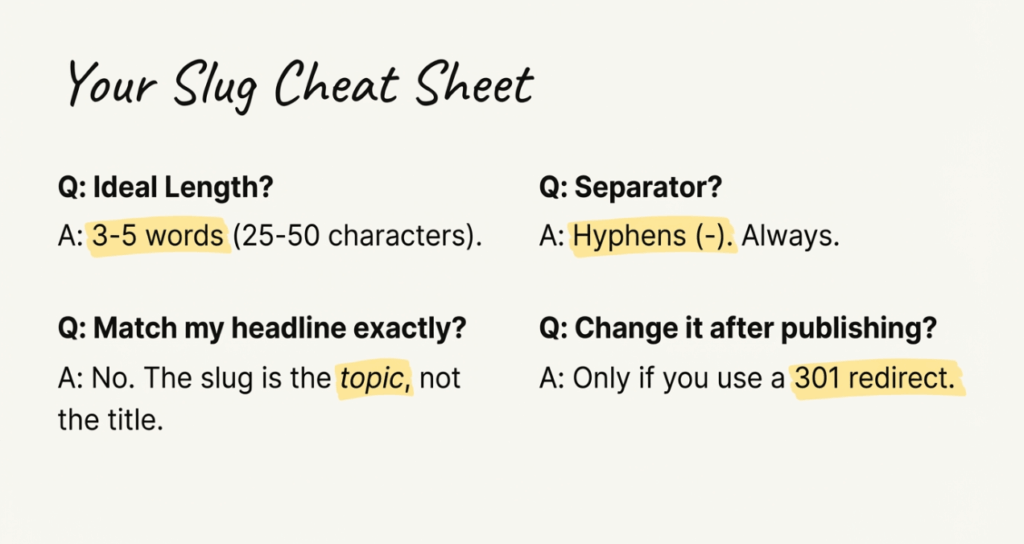
The ideal slug length is 3-5 words, or roughly 25-50 characters. This gives you enough space to be descriptive without becoming unwieldy.
Compare these options for an article about email marketing automation:
- Too short: /automation
(not descriptive enough) - Just right: /email-marketing-automation
(clear and concise) - Too long: /complete-guide-to-email-marketing-automation-for-beginners-2026
(excessive)
Shorter slugs are easier to read, remember, and share. They also display better across devices and platforms.
Include Your Target Keyword
Your primary keyword should appear in your slug when it makes sense naturally. This helps search engines understand your page topic and improves relevance signals.
If your target keyword is “UTM parameters,” your slug might be:
- /guide/utm-parameters
(direct keyword use) - /blog/understanding-utm-parameters
(keyword with context)
Don’t force keywords where they don’t fit. A natural, readable slug is more important than exact keyword matching.
Use Hyphens to Separate Words
Always use hyphens (-) to separate words in slugs. Never use underscores, spaces, or other characters.
- Correct: email-marketing-tips
- Incorrect: email_marketing_tips
- Incorrect: email%20marketing%20tips
Google explicitly recommends hyphens over underscores. Search engines recognize hyphens as word separators, making your slug readable to algorithms.
Use Lowercase Letters Only
Stick to lowercase letters in all slugs. While some servers treat URLs as case-insensitive, others don’t. Using lowercase consistently prevents:
- Duplicate content issues (same page accessible via different URL cases)
- Broken links from inconsistent capitalization
- Confusion when sharing URLs verbally or in text
Remove Stop Words
Stop words are common words like “the,” “and,” “of,” “to,” and “in” that don’t add meaning. Removing them keeps slugs concise:
- With stop words: how-to-create-a-url-slug-for-your-website
- Without stop words: create-url-slug-website
The shorter version communicates the same topic with less clutter. However, don’t remove stop words if doing so makes the slug confusing or grammatically nonsensical.
Avoid Dates and Numbers
Including dates or specific numbers in slugs creates problems:
- /best-marketing-tools-2025
becomes outdated in 2026 - /10-email-tips
requires URL changes if you add more tips
Instead, use evergreen slugs:
- /best-marketing-tools
- /email-marketing-tips
You can include dates in your content and update them without changing the URL. This preserves your link equity and prevents broken links.
Make Slugs Evergreen
Think long-term when creating slugs. Will this URL still make sense in two years? Five years?
Avoid references to:
- Current events that will become dated
- Specific versions of software
- Time-sensitive promotions
- Numbers that might change
An evergreen slug like /guide/campaign-trackingwill remain relevant regardless of how your content evolves.
URL Slug Best Practices for Different Content Types
Different types of pages call for different slug approaches.
Blog Post Slugs
For blog content, focus on the primary topic rather than trying to capture the full headline:
- Headline: “7 Email Marketing Mistakes That Are Killing Your Open Rates”
- Slug: /blog/email-marketing-mistakes
Blog slugs should be topical and evergreen. Avoid including numbers from listicles or dates from time-sensitive content.
Product Page Slugs
Product slugs should include the product name and key identifying features:
- /products/wireless-bluetooth-headphones
- /shop/running-shoes-mens
Include category information if it helps clarity, but keep the slug focused on what users are searching for.
Category and Tag Slugs
Category slugs organize your content architecture:
- /blog/category/email-marketing
- /products/category/audio-equipment
Keep category slugs broad enough to encompass all related content. Avoid overly specific categories that limit future content.
Landing Page Slugs
Landing pages often target specific campaigns or keywords:
- /free-trial
- /demo-request
- /pricing
These slugs should be action-oriented and match user intent. They’re often shorter than blog or product slugs because they target high-intent searches.
Common URL Slug Mistakes to Avoid
Even experienced marketers make these slug errors. Here’s what to watch for:
Keyword Stuffing
Cramming multiple keywords into a slug backfires:
- Bad: /email-marketing-email-automation-email-campaigns-guide
- Good: /email-marketing-automation
Keyword-stuffed slugs look spammy to users and provide no SEO benefit. Search engines may even view this negatively.
Using Auto-Generated Slugs
Many content management systems auto-generate slugs from headlines. These often include:
- Stop words that should be removed
- Excessive length from long headlines
- Random numbers or IDs
Always customize your slug manually rather than accepting the default.
Including Special Characters
Avoid special characters in slugs:
- No apostrophes: Use dont
instead ofdon’t - No ampersands: Use and
or omit entirely - No question marks, exclamation points, or other punctuation
Special characters can cause encoding issues and make URLs harder to share.
Making Slugs Too Long
Long slugs create multiple problems:
- Truncated display in search results
- Difficult to share verbally
- Harder to remember
- Look unprofessional
If your slug exceeds 60 characters, look for words to cut.
Changing Slugs Without Redirects
Once a page is live and indexed, changing its slug without proper redirects destroys:
- Search engine rankings for that URL
- Backlinks from other sites
- Bookmarks and saved links
- Internal links throughout your site
If you must change a slug, always implement a 301 redirect from the old URL to the new one.
How to Change URL Slugs Without Hurting SEO
Sometimes you need to update an existing slug. Maybe it was auto-generated, contains errors, or no longer reflects the content. Here’s how to do it safely.
When to Change Existing Slugs
Consider changing a slug when:
- It contains random numbers or IDs instead of descriptive text
- It’s excessively long and gets truncated
- It doesn’t include relevant keywords
- It contains typos or errors
- The page topic has significantly changed
Don’t change slugs just for minor optimization. The risk of broken links often outweighs small potential gains.
Setting Up 301 Redirects
A 301 redirect tells search engines and browsers that a page has permanently moved. When implemented correctly, it:
- Passes most link equity to the new URL
- Prevents 404 errors for old links
- Maintains rankings during the transition
Most CMS platforms offer redirect plugins or built-in redirect features. For WordPress, plugins like Redirection or Yoast SEO Premium handle this automatically.
Updating Internal Links
After changing a slug, search your site for internal links pointing to the old URL. While redirects handle the technical routing, direct links to the new URL are cleaner and faster.
Check:
- Navigation menus
- Related post sections
- In-content links
- Footer links
- Sitemap files
Monitoring for Broken Links
After any slug change, monitor for issues:
- Check Google Search Console for crawl errors
- Use a site crawler to find broken links
- Monitor 404 error logs
- Test the redirect manually
Catch problems quickly before they impact your traffic or rankings.
URL Slugs and Campaign Tracking
For marketers running campaigns across multiple channels, URL slugs work alongside UTM parameters to create trackable, organized links.
How Slugs Work with UTM Parameters
A complete campaign URL might look like:
https://yoursite.com/blog/email-marketing-guideutm_source=newsletter&utm_medium=email&utm_campaign=spring_2026
Here, the slug (email-marketing-guide) identifies the content, while UTM parameters track where the traffic came from. Both elements matter:
- The slug tells users and search engines what the page is about
- UTM parameters tell your analytics platform how visitors found it
Following UTM best practices alongside slug optimization ensures your campaign tracking is both user-friendly and analytically useful.
Creating Consistent Slugs for branded links
When using branded short links for campaigns, the slug portion becomes even more visible:
- Generic: bit.ly/3xF9kL
(meaningless) - Branded: link.yourcompany.com/spring-sale
(descriptive)
Branded links with descriptive slugs build trust and increase click-through rates. Users can see exactly where the link leads before clicking.
Team Collaboration on Naming Conventions
When multiple team members create URLs and campaign links, inconsistency creeps in. One person uses email-newsletter, another usesnewsletter-email, and a third usesemail_news.
Establish clear naming conventions for your team:
- Standard format for slug structure
- Approved words and abbreviations
- Character limits
- Required elements (keywords, categories, etc.)
Tools like linkutm’s UTM builder can enforce these conventions automatically, ensuring every link follows your standards.
URL Slug Examples by Industry
Let’s look at effective slug patterns across different contexts:
E-commerce
- /products/wireless-earbuds-pro
- /collections/summer-sale
- /shop/mens-running-shoes
SaaS/Technology
- /features/analytics-dashboard
- /integrations/salesforce
- /pricing
Content/Media
- /blog/social-media-strategy
- /podcast/episode-47
- /guide/content-marketing
Professional Services
- /services/web-design
- /case-studies/client-name
- /about/team
Notice how each example is concise, descriptive, and includes relevant keywords without being stuffed or excessive.
URL Slug FAQs
What is the difference between a URL and a slug?
A URL is the complete web address, including the protocol (https://), domain, path, and any parameters. The slug is just the final descriptive portion that identifies a specific page. Think of the URL as the full address and the slug as the apartment number.
Do URL slugs affect SEO?
Yes, but minimally. Google has confirmed that words in URLs are a ranking factor, though a “very very lightweight” one. The bigger impact is on user experience and click-through rates. Users trust and click descriptive URLs more often than random or suspicious-looking ones.
How long should a URL slug be?
Aim for 3-5 words, or approximately 25-50 characters. This length is descriptive enough to communicate the topic while staying concise enough to display properly across devices and platforms.
Start Optimizing Your URL Slugs Today
URL slugs might seem like a small detail, but they touch every aspect of your online presence. From search rankings to social shares, from email campaigns to AI-powered search, well-crafted slugs make your content more discoverable and trustworthy.
Here’s your action plan:
- Audit existing slugs – Review your most important pages for optimization opportunities
- Establish naming conventions – Create guidelines for your team to follow
- Optimize new content – Apply these best practices to every new page you publish
- Set up redirects – If you change any existing slugs, implement 301 redirects immediately
- Monitor performance – Track how optimized URLs perform in search and click-through rates
Remember: the best slug is one that clearly communicates your page topic in the fewest possible words. Keep it short, descriptive, keyword-focused, and evergreen.
Ready to bring the same consistency to your campaign tracking? linkutm’s UTM builder helps you create organized, trackable links that follow your naming conventions automatically. Stop wrestling with spreadsheets and start tracking what actually drives results.